

The right document does two jobs at once: it states what you want, and it shows who is legally bound. If I get the purpose, legal name, signer role, and signing rules right, I cut down the risk of disputes, delays, and invalid paperwork.
Here’s the short version:
- Personal documents cover my life, family, health, money, and property
- Business documents cover my company’s setup, contracts, hiring, and records
- I should always use the exact legal name, not just a DBA
- Some documents need only a signature, while others need witnesses or notarization
- E-signatures are valid for many U.S. documents under 15 U.S.C. § 7001
- Estate plans should be reviewed after marriage, divorce, birth, death, a move, or major asset changes
- Business records often need to be kept for years; for example, tax records are often kept for 7 years, and I-9s follow a different rule: 3 years from hire or 1 year after termination, whichever is later
If I had to boil it down even more, I’d use this checklist before I sign anything:
- Match the form to the exact job
- Use the correct legal name
- Confirm who has authority to sign
- Follow state rules for witnesses or notarization
- Store the final version where I can find it
- Review it on a set schedule
Quick comparison
| Type | What it covers | Who signs | Common examples | Extra steps |
|---|---|---|---|---|
| Personal | Health, estate, family, personal loans, property | Me as an individual | Will, POA, living will, prenuptial agreement, promissory note | Often witnesses or notary, depending on state |
| Business | Entity setup, contracts, HR, tax and compliance files | Me for the company, with title | Operating agreement, NDA, service agreement, I-9, offer letter | Correct entity name, signer title, record retention |
In plain English: I should not treat documents like one-time forms. I need a simple system – pick the right form, sign it the right way, keep it safe, and update it when life or business changes.
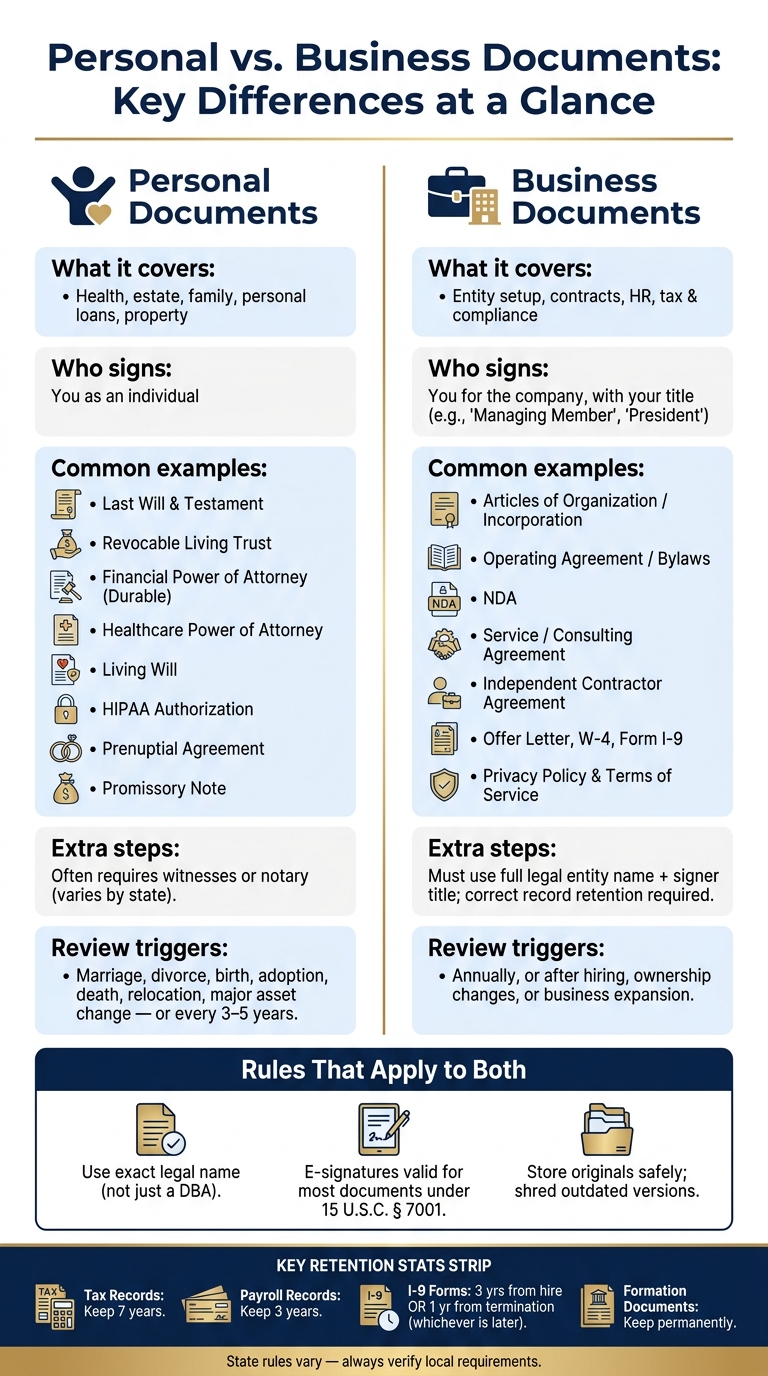
Personal vs. Business Documents: Key Differences at a Glance
Don’t sign business documents using your personal name
sbb-itb-a688917
Key Rules to Apply Before You Select Any Document
Use these rules to narrow the field before you download or draft a form. First, get clear on the document’s purpose. Then confirm the signer, the exact legal name, and how the document must be signed.
Match the Document to Its Exact Purpose
Start with the document’s exact purpose. Be specific about the job it needs to do: contract, confidentiality, estate planning, transfer, loan, or medical authority.
Each document does a different thing. A contract creates obligations. An NDA protects confidentiality. An operating agreement sets rules for ownership and control. A power of attorney lets someone act on another person’s behalf. An IP assignment transfers rights.
Independent contractors own their work by default unless a written transfer assigns it to the business [2].
Once you’ve picked the right form, check the exact legal name and who has authority to sign.
Use Correct Legal Names, Ownership Details, and Signer Authority
The name decides who is legally bound. Use the exact legal name from formation records, not a DBA. That designator – "LLC", "Inc.", or "Corp." – points to the entity, not the individual.
Never sign a business contract using only a DBA. If you sign under a trade name without naming the legal entity behind it, a court may treat the contract as your personal obligation instead of the business’s. Always format signature blocks as: [Legal Entity Name], By: [Signature], [Printed Name], [Title]. Adding your title – "Managing Member", "President", or "Owner" – can help preserve the liability shield.
| Name Type | Purpose | Why It Matters |
|---|---|---|
| Legal Name | Government filings, contracts, bank accounts | Defines the actual legal entity responsible for obligations |
| Trade Name / DBA | Branding and public-facing identity | Does not provide liability protection on its own |
| Trademark | Brand protection, logos, slogans | Provides nationwide protection against confusingly similar names |
Before signing anything, verify that the business name is active in the Secretary of State’s database. Also check the USPTO database to avoid trademark conflicts.
Next, confirm whether the document needs witnesses, notarization, or an electronic signature.
When You Need a Signature, Witnesses, or a Notary
Most standard business contracts – NDAs, employment offers – only need signatures to be enforceable. Under the federal E-SIGN Act (15 U.S.C. § 7001), electronic signatures have the same legal weight as ink signatures for most of these documents [3].
Some documents need more. Wills and some health care directives require witnesses to confirm the signer’s identity and mental capacity. Powers of attorney, real estate deeds, and affidavits often require notarization, where a commissioned notary public checks the identities of the signers. These rules vary by state, so check your state’s requirements before you finalize any document.
| Execution Method | Typical Documents | Why It Is Used |
|---|---|---|
| Signature Only | Standard service contracts, NDAs, employment offers | Establishes mutual intent and binding obligations for routine matters |
| Witnesses | Wills, some health care powers of attorney | Provides third-party verification of the signer’s identity and capacity |
| Notarization | Deeds, powers of attorney, affidavits | Prevents fraud by having a public official verify signer identities |
Miss one required step, and the document may not hold up when you need it most.
With the selection rules set, the next step is knowing which personal documents belong in place.
Personal Documents Every Individual and Family Should Have
Set these personal documents up before anything goes wrong. When a health issue, death, or money dispute hits, it’s a bad time to start hunting for forms or guessing what someone “would have wanted.”
Estate Planning and Health Care Documents
A Last Will and Testament says who gets your assets after death. It’s also the only document you can use to name a guardian for your minor children.
A Revocable Living Trust can help avoid probate, but there’s a catch: it only works if you actually fund it. That means retitling accounts and real estate into the trust. If you skip that step, the trust may not do much.
Your Financial Power of Attorney should be durable if you want someone to handle bills, taxes, and investments after incapacity. This document protects you while you’re still alive but unable to act for yourself.
Match that with a Healthcare Power of Attorney, which names the person who can make medical decisions for you. Then add a Living Will, which spells out your wishes for end-of-life care, such as ventilation or feeding tubes.
A HIPAA Authorization matters too. It lets your chosen agent get access to protected medical information, which can help avoid delays during a health crisis.
One more item often gets missed: beneficiary forms. Check every 401(k), IRA, and life insurance policy. Those designations control where those assets go, and they can override what your will says.
Family, Property, and Personal Finance Agreements
Some personal agreements can cut down on fights over money and property.
A prenuptial agreement lays out what each person owns before marriage and how assets are handled if the marriage ends. A promissory note puts a personal loan in writing, including the amount borrowed, any interest rate, and the repayment terms. A bill of sale records the transfer of personal property and helps prove the deal happened.
Have all parties sign the document. Prenuptial agreements and promissory notes should also be notarized.
When to Update Personal Documents and How to Store Them
Review these documents after big life changes, including:
- marriage or divorce
- birth or adoption
- death or incapacity of a named agent
- a move
- a major asset change
If none of those happen, review them every three to five years.
For storage, keep originals in a fireproof and waterproof home safe or at your attorney’s office. A safe deposit box can create access problems. In some states, a court order may be needed to open a deceased person’s box.
Digital copies are still worth having. Secure cloud storage works well for backups, and you should give copies of your healthcare directive to your primary care physician and your named agent.
| Document | Key Purpose | Typical Witnesses or Notary | When Usually Needed | Where Typically Stored |
|---|---|---|---|---|
| Last Will & Testament | Distribute assets; name guardians | 2 witnesses + notary for a self-proving will | After death | Fireproof safe / attorney’s office |
| Revocable Living Trust | Avoid probate; manage assets | Notary | During life and after death | Fireproof safe / attorney’s office |
| Financial POA (Durable) | Manage money if incapacitated | Notary; some states also require witnesses | During incapacity | Agent’s copy / home safe |
| Healthcare POA | Name an agent for medical decisions | Witnesses or notary, depending on state | During a medical crisis | Doctor’s file / agent’s copy |
| Living Will | State end-of-life care preferences | Witnesses or notary, depending on state | Terminal illness / incapacity | Doctor’s file / agent’s copy |
| HIPAA Authorization | Allow access to medical records | Signed and dated by the individual | During a medical crisis | With healthcare directive |
| Prenuptial Agreement | Define property rights before marriage | Notary | Before marriage | Home safe / attorney’s office |
| Promissory Note | Document a personal loan | Notary | When lending money | Home safe |
Small Business Legal Documents offers lawyer-reviewed templates for powers of attorney, bills of sale, and promissory notes.
The same selection rules apply to business documents, but signer authority and record retention matter even more there.
Business Documents Every Small Business Owner and Freelancer Needs
The same basic idea applies to business documents, but the stakes get bigger fast. These documents help guard liability, ownership, cash flow, and compliance. Pick the wrong document – or skip one entirely – and problems can pile up in a hurry.
Formation and Governance Documents
Once your business entity is set up, these records spell out who runs it and how decisions get made. An LLC files Articles of Organization with the state. A corporation files Articles of Incorporation. Filing fees usually fall between $50 and $500, depending on the state [2]. If you’re a sole proprietor using a trade name, you may also need a DBA (Doing Business As) filing, along with any business licenses your state or city requires.
That filing is just the starting line. An Operating Agreement for an LLC or Bylaws for a corporation lays out ownership percentages, profit distribution, and decision-making authority. If those documents don’t exist, state default rules take over. That’s rarely where you want to leave things.
Corporations also need board minutes or resolutions, plus a stock ledger to track equity. If outside investors ever come into the picture, a clean and accurate cap table isn’t optional. It’s one of those things people ignore until someone asks for it.
Contracts, HR Records, and Compliance Files
Once the business is up and running, contracts and HR records help protect day-to-day work. A service agreement or consulting agreement should lock down scope, payment terms, deliverables, and termination rights before any client work starts. Verbal deals can sound fine in the moment, but they’re tough to enforce when a dispute shows up later.
An NDA should be signed before you share pricing, client lists, or proprietary methods with anyone, whether that’s a partner, contractor, or early hire. An independent contractor agreement should also be in place before a freelancer begins work. And every contractor agreement should include an IP assignment clause. Without that transfer in the contract, contractors own their work by default.
Hiring your first employee adds a new stack of paperwork: an offer letter, W-4, Form I-9, and an employment agreement that covers compensation, job duties, and termination. An employee handbook can help too, but only if managers apply it the same way every time. A handbook no one follows won’t do much when it matters.
If your website collects emails, cookies, or payments, you also need a Privacy Policy and Terms of Service.
Small Business Legal Documents includes more than 2,000 lawyer-reviewed templates across these categories, including service agreements, NDAs, contractor agreements, and HR documents. Each one can be customized to fit your situation.
Signing Authority and Record Retention for Businesses
After documents are signed, record retention decides how long they stay useful – and safe to rely on. Every contract should list the entity’s full legal name and the signer’s title. For example, "Jane Smith, Manager of Riverside Creative LLC." That small detail can matter a lot if authority is ever questioned.
The IRS usually has three years to audit. That window can stretch to six years if income is underreported by more than 25%, which is why many businesses hold tax records for seven years [4]. Payroll records need to be kept for three years. I-9 forms follow a different rule: three years from the date of hire or one year from termination, whichever is later [4].
| Document Category | Recommended Retention | Legal Driver |
|---|---|---|
| Formation Documents | Permanent | State corporate law |
| Tax Returns & Support | 7 years | IRS statute of limitations |
| Active Contracts | Life of contract + 7 years | Statute of limitations for breach |
| Payroll Records | 3 years | FLSA Section 516 |
| I-9 Forms | 3 yrs from hire / 1 yr from term | IRCA |
| Employment Applications | 1 year | EEOC regulations |
| OSHA Incident Reports | 5 years | OSHA 29 CFR 1904 |
Keep I-9 forms in a separate file. If an audit happens, that limits what inspectors can access [4]. And once litigation is foreseeable, stop destroying records. Destroying documents after that point can lead to serious court sanctions [4].
That leads to the last step: choosing the right templates and keeping them up to date as the business changes.
Using Templates and Managing Documents Over Time
How to Choose a Reliable U.S. Document Template
Once you know what the document needs to do and how it must be signed, the next step is picking a template that fits your state and your situation.
The biggest mistake here is simple: using the wrong form. A document written for one state’s employment rules may not work in another state. And a generic NDA can leave out clauses your field may need.
When you compare templates, focus on four things:
- U.S.-focused language
- State-specific options
- Step-by-step instructions
- Clauses that fit the document’s purpose
Small Business Legal Documents offers more than 2,000 lawyer-reviewed templates across business, personal, real estate, and creative categories. It also includes a jurisdiction selection engine and a questionnaire-based customization tool [1].
How to Draft, Sign, Store, and Update Your Documents
Every document has a lifecycle. Miss one stage, and problems can show up later. The table below gives you a simple path from draft to storage.
| Stage | Personal Documents | Business Documents |
|---|---|---|
| Draft | Use templates for wills, POAs, and healthcare directives | Use lawyer-reviewed templates for NDAs, service agreements, and operating agreements |
| Review | Verify beneficiaries, agents, and healthcare wishes | Confirm scope, payment terms in USD, IP assignment, and signer authority |
| Sign | Often requires witnesses and a notary | Use authorized signatures for most contracts |
| Store | Keep originals in a fireproof safe; share digital copies with family | Use organized digital storage with secure backups |
| Review/Update | Update after marriage, divorce, birth, or major asset changes | Audit annually or after hiring, ownership changes, or expansion |
| Destroy | Shred outdated versions to avoid confusion during probate | Retain tax records for 7 years before shredding |
Use each party’s full legal name and current address. Write payment terms in U.S. dollars, with exact amounts and due dates. If wording is fuzzy, a court may read it against the person who drafted it. That’s why clear language matters so much.
For personal documents such as wills and powers of attorney, follow your state’s witness and notarization rules. For most business contracts, e-signatures are generally valid under 15 U.S.C. § 7001 [3].
When the retention period ends, shred paper records securely and permanently delete digital files.
Conclusion: Build a Document System That Works for Your Life and Business
Signing a document isn’t the finish line. After that, the job is keeping everything current.
A set of personal and business documents only helps if it still matches your life and your company as they change. Choose the right form for the job, sign it the right way, store it safely, and review it on a set schedule – at least once a year, or after any major life or business change. That’s how a stack of paperwork becomes long-term protection.
FAQs
How do I know which document I actually need?
Start by figuring out your business structure and what you’re trying to do. For most people, the first papers to gather are formation documents, internal governance documents like bylaws or operating agreements, and an EIN.
If you’re not sure where to start, look through document categories or use search filters to match contracts, policies, or personal records to your situation. Then focus on the big stuff first by putting key arrangements into written, signed agreements.
Can I sign this electronically?
Yes. Most personal and business documents can be signed electronically, and e-signatures are generally legally enforceable under federal law.
That said, some documents, such as wills or those that require notarization or witness signatures, may still need specific signing methods to be legally valid.
When should I update my personal or business documents?
Update your personal or business documents when your situation, day-to-day operations, or legal duties change. A good rule of thumb is to review them at least once a year so they stay useful and compliant.
Common triggers include:
- ownership or leadership changes
- major updates to tools, software, data flows, or your website
- changes in laws or industry rules
- board actions or equity issuances that call for updated records