
A SaaS contract can cost you money, trap your data, and shift legal risk onto your team if you skim the fine print. I’d review 5 areas before signing: commercial terms, exit rights, data/privacy, security/compliance, and liability/SLA.
Here’s the short version:
- Match the review to the data risk. Personal data, PHI, card data, student records, and government data each trigger different rules.
- Lock down pricing and renewals. Watch for “then-current rates,” vague usage limits, short payment terms, and long auto-renew notice windows.
- Protect your data. I’d confirm data ownership, DPA terms, subprocessor notice, export rights, deletion timing, and a no-AI-training clause.
- Check security terms in writing. Look for named standards like SOC 2 Type II or ISO 27001, AES-256 at rest, TLS 1.3+ in transit, and 72-hour breach notice.
- Test risk allocation. A low liability cap, no carve-outs, weak indemnity, or credits as your only fix can leave you exposed.
- Plan for exit before day one. A 60- to 90-day export window is far safer than rushed deletion in a week.
- Re-check at renewal. Poor contract management can cost companies 5% to 9% of annual revenue.
If I were doing a first-pass review, I’d mark each clause Yes / No / Needs Legal Review and send weak spots to counsel before anyone signs.
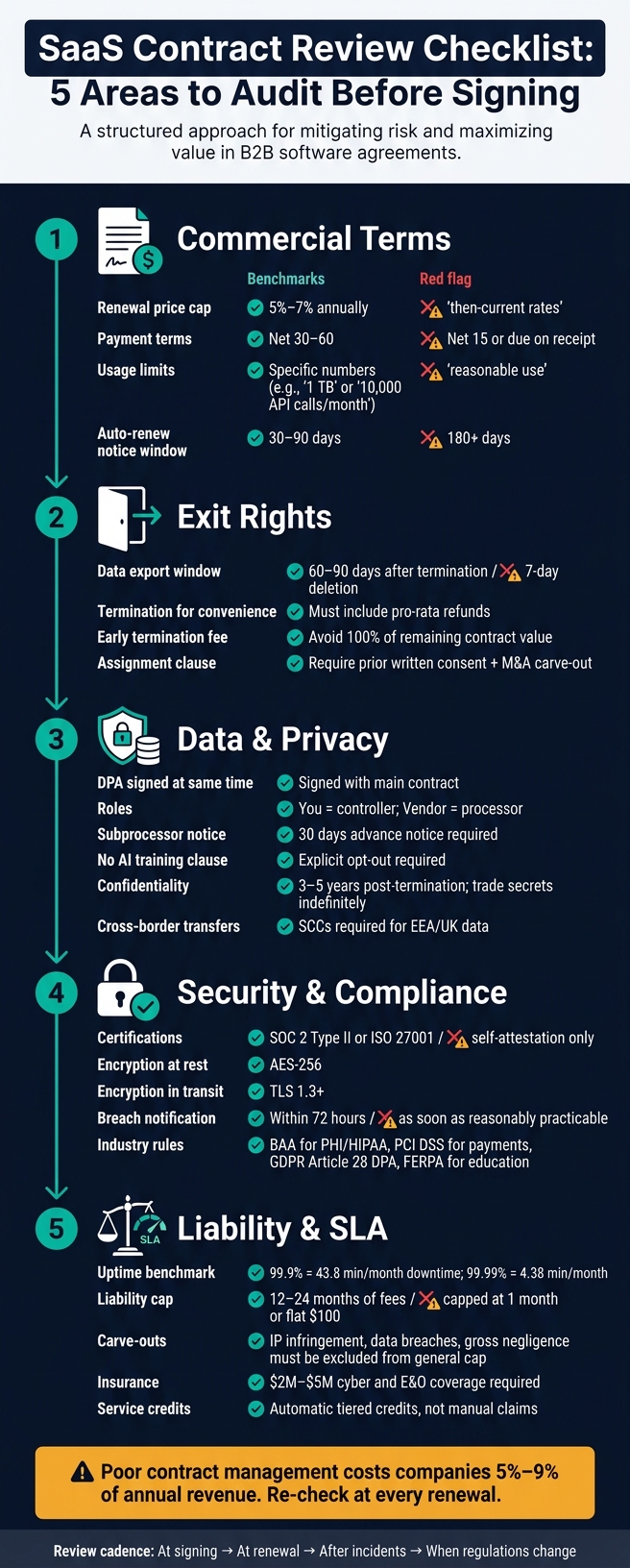
SaaS Contract Review Checklist: 5 Areas to Audit Before Signing
12 Essential Clauses in SaaS Agreements
sbb-itb-a688917
Part 1: Confirm core business and legal terms
These clauses shape three big things: what you pay, what you get, and how hard it is to leave. Review them in that order. Start with commercial risk, move to exit rights, then check ownership and confidentiality.
Scope, pricing, and usage limits
The contract should say exactly what you’re buying. That means which features are included, which integrations are covered, and what support comes with the deal – email, chat, or phone.
If the language is fuzzy, the vendor has room to turn things like SSO or API access into paid add-ons in the middle of the term. That’s why it helps to push for a feature freeze clause. In plain English, it stops the vendor from removing or materially downgrading key features during the contract term unless you agree or have a right to terminate [3].
Pricing needs the same level of care. Two traps show up all the time.
- "Then-current rates" at renewal. Try to get a written cap of 5% to 7% annually as a fair benchmark [1].
- Overage charges tied to vague usage terms. Limits should be stated as hard numbers, like 1 TB storage or 10,000 API calls/month, not soft phrases like "reasonable use" or "fair use." Those terms give the vendor room to slow access or send surprise bills [3].
| Clause | Healthy Benchmark | Red Flag |
|---|---|---|
| Renewal Price Cap | 5%–7% annually [1] | "Then-current rates" [1] |
| Payment Terms | Net 30 or Net 60 [3] | Due upon receipt / Net 15 [3] |
| Usage Limits | Specific numbers (e.g., 1 TB storage) [3] | "Reasonable" or "Fair Use" [3] |
| Late Fees | 1.5% per month [3] | 3% per month or flat admin fees [3] |
Renewal, termination, and assignment terms
Auto-renewal is one of the easiest ways SaaS spend slips through the cracks [6]. Standard notice periods are often 30 days, while enterprise deals usually land somewhere between 30 and 90 days. Once the notice window goes past 90 days – say, 180 days – you should treat that as a warning sign [1][3].
A simple fix: set calendar reminders at 120, 90, 60, and 30 days before the notice deadline. That gives you room to review the deal instead of sleepwalking into another term [1][6].
Termination for convenience matters too. This is your right to leave without cause. Vendors often push back hard, or they attach an early termination fee worth 100% of the remaining contract value. At that point, the clause doesn’t help much [3].
If you do get termination for convenience, make sure it also gives you pro-rata refunds for prepaid fees. Then look at the assignment clause. It should require the vendor’s prior written consent to assignment, but it also needs an M&A carve-out so your own company deal doesn’t get blocked [2]. And if the vendor gets bought by a direct competitor, keep a termination right in place [6].
Data access after termination is another spot where deals can go sideways. Require a 60- to 90-day data export window [3]. A 7-day deletion window is a red flag.
Ownership, confidentiality, and publicity
Once cost and exit rights are covered, pin down who owns what and what the vendor can do with your information.
The contract should draw a clean line between the software and the data. The vendor owns the software. You own your data. The vendor should get only a limited license to host, store, and process that data so it can provide the service – nothing broader [1][7].
If you paid for custom development or configurations, get that in writing too. You should own those items, while the vendor keeps only an operating license [3].
Add a clear no-training clause that bars use of your data for AI model training [1][6].
Confidentiality should be mutual. It should last 3 to 5 years after termination, with trade secrets protected indefinitely. Also remove residual-knowledge carve-outs. That language can let vendor employees use information they simply remember from working with your data [2][6].
And one more thing that gets missed more than it should: require prior written consent before the vendor uses your name or logo [2][8].
Part 2: Review privacy, security, and regulatory terms
After you settle the money side, look at the part many teams rush past: how the contract handles your data and who owns each compliance job.
Data processing and privacy addendum
The DPA should be signed at the same time as the main contract, not tacked on later [1].
It should name you as the controller and the vendor as the processor [9][5]. It also needs to limit data use to service delivery and block model training unless you give written consent [5][1][3]. The contract should say how long data is kept, when export access ends, and when deletion begins, including secure deletion from live systems and backups [9][1][3].
Just as important, keep the DPA, service agreement, privacy notice, security docs, and trust center in sync. If those documents say different things, trouble usually follows.
Two DPA points need extra care. The first is subprocessor governance. The vendor should keep a current list of subprocessors, such as AWS or Stripe, and show what each one does and where each one is located. You should get at least 30 days’ advance notice before a new subprocessor is added, plus a right to object [5][1][10]. Don’t agree to language that only links to a webpage the vendor can change without notice.
The second is cross-border transfers. If data moves outside the EEA or UK, the DPA should include approved transfer tools such as Standard Contractual Clauses (SCCs) [9][5][1].
Once the DPA is set, the next step is checking the vendor’s security terms and breach notice deadline.
Security controls and incident response
Push for language tied to specific frameworks, such as SOC 2 Type II or ISO 27001, instead of loose phrases like "reasonable efforts" or "industry-standard security" [2][10]. Ask for the latest audit report and attach it as a contract exhibit [10].
On the technical side, the contract should spell out AES-256 encryption for data at rest and TLS 1.3 or higher for data in transit [11]. Breach notice timing matters just as much. Aim for notice within 72 hours after the vendor becomes aware of a confirmed incident [9][1]. Open-ended timing is a bad sign.
| Security Clause | Standard Requirement | Red Flag |
|---|---|---|
| Breach Notification | Within 72 hours of awareness [9][1] | "As soon as reasonably practicable" |
| Encryption (at rest) | AES-256 [11] | Not specified |
| Subprocessors | 30-day advance notice of changes [1] | Unilateral changes without notice |
| Certifications | Current SOC 2 Type II or ISO 27001 report [10] | Self-attestation only |
| AI Training | Explicit opt-out for customer data [1] | "To improve our services" |
Also check data residency: where your data is stored and processed. In some industries and regions, this isn’t just a preference. It’s a legal rule [5][10].
Then tie those controls back to the rules that apply to your business.
Industry-specific compliance requirements
If you handle protected health information, the vendor must sign a Business Associate Agreement (BAA) under HIPAA [3][12]. If you handle payment data, document PCI DSS compliance. If you deal with California consumer data, assign CCPA/CPRA duties in writing [1][9].
Financial services companies should check GLBA, SEC, and FINRA rules. Education platforms need to address FERPA. The contract should make clear which party handles each duty [3][12][5]. And if your vendor processes data for EU or UK customers or employees, GDPR applies, and GDPR Article 28 requires a signed DPA [9].
Add a clear AI training opt-out that says your data will not be used to train the vendor’s machine learning models without your express written consent [1][3]. Treat anonymized or aggregated data as off-limits for training unless you say yes.
Part 3: Test service levels and risk allocation
With privacy covered, the next step is simple: check uptime, support, indemnity, and liability.
This is where the contract stops being theory and starts showing what happens when things go wrong.
SLA, support, and remedies
In B2B SaaS, 99.9% uptime is a common benchmark.
| Uptime % | Downtime per Month | Downtime per Year |
|---|---|---|
| 99.0% | 7.2 hours | 3.65 days |
| 99.5% | 3.6 hours | 1.83 days |
| 99.9% | 43.8 minutes | 8.76 hours |
| 99.99% | 4.38 minutes | 52.6 minutes |
That table tells the story fast. A small change in uptime percentage can mean a big jump in downtime. On paper, 99.9% and 99.99% can look close. In practice, they are not.
Also check what counts toward uptime. Maintenance windows should be scheduled in advance, such as with 7 days’ notice, and excluded from uptime calculations so the actual service level is clear.
Once uptime is set, look at support speed and the remedies that apply when the vendor misses the mark. If the SLA promises a lot but support moves slowly, the promise doesn’t mean much.
Support terms should set severity-based response times and an escalation path.
| Priority | Description | Response Time | Resolution Target |
|---|---|---|---|
| P1 (Critical) | Production system down; total loss of service | 1 hour | 4 hours |
| P2 (High) | Major feature impaired; no workaround | 4 hours | 24 hours |
| P3 (Medium) | Minor issue; workaround available | 1 business day | 5 business days |
| P4 (Low) | Feature requests or documentation queries | 3 business days | 3 business days |
Push for automatic tiered service credits, not credits you have to chase down and claim yourself. And preserve claims for gross negligence and willful misconduct, even if the SLA says credits are the sole remedy [1][9].
Warranties, indemnities, and liability cap
After service credits, test how much financial risk the vendor actually carries.
A common liability cap is 12 months of fees [9][2][1]. For tools that touch sensitive data, production systems, or payments, push for 2x to 3x annual fees, or a separate higher cap for data breach risk [1][3].
The carve-outs matter more than the cap size. That’s the part many teams miss. A decent-looking cap doesn’t help much if every serious claim still gets squeezed under it.
IP infringement, data breaches, confidentiality violations, gross negligence, and willful misconduct should be carved out of the general cap or put under a separate higher cap [9][13][2][1]. The vendor should also defend and indemnify you against third-party claims that its software infringes a patent, copyright, or trademark.
And don’t stop at contract language. Verify that the provider carries at least $2 million–$5 million in cyber and errors-and-omissions (E&O) coverage [9][2][3].
| Provision | Acceptable Position | High-Risk Position |
|---|---|---|
| Liability Cap | 12–24 months of fees; separate higher cap for data breach risk | Capped at 1 month of fees or a flat low sum (e.g., $100) |
| Carve-outs | IP infringement, data breaches, confidentiality violations, gross negligence, and willful misconduct excluded from general cap | No carve-outs; all claims subject to the same low cap |
| Insurance | At least $2M–$5M in cyber and E&O coverage | No coverage requirement or self-attestation only |
One more point that matters more than people think: require data export in JSON or CSV before the vendor deletes your data [1][3].
Final review: Approve, escalate, and re-check
Internal approval workflow
After the clause review, send the contract through sign-off. Give each reviewer a clear lane.
- The business owner checks commercial terms like pricing, renewal caps, and usage limits.
- IT and security review technical controls such as encryption, SSO, and incident response.
- Privacy or compliance makes sure the DPA is signed and any regulatory requirements are met.
If someone flags an open issue, stop and escalate it to legal before signing. A missing DPA is a good example. It may look like a small paperwork gap, but it can create a much bigger problem later.
Template support and recurring review
Once the contract is signed, don’t shelve the checklist. Use that same checklist again at renewal and after major changes. Re-check contracts at renewal [1][3]. Re-check them after any security incident too, or when the vendor’s data practices change, or when a new regulation applies.
A template library helps keep repeat documents in line. That includes DPAs, confidentiality policies, and vendor agreements. The point is simple: standard protections should show up every time, not only when someone happens to remember them.
Key takeaways
The final check is operational, not just legal. Use the checklist across core terms, privacy and security, SLA and risk allocation, internal approval, and recurring review. Then send unresolved issues to legal and run the process again at renewal, after incidents, and when regulations change.
Skipping recurring review can get expensive fast. Companies typically lose 5%–9% of annual revenue due to poor contract management [4]. A recurring review calendar isn’t overhead. It’s one of the plainest ways to avoid that number.
FAQs
How do I know which compliance rules apply to my SaaS contract?
Review your product model, the data you handle, and where both you and your customers do business. Then map out your data flows and app usage so you can see whether rules like GDPR, CCPA, or HIPAA apply.
That means looking at what data you collect, where it moves, who can access it, and how it’s stored inside your app and across your tools. Once you lay it out, the legal picture gets a lot clearer.
You should also check sector rules tied to finance, health, or education. And make sure documents like your Privacy Policy and Data Processing Agreement stay up to date with your current data practices, technical stack, and sub-processors.
What should I negotiate before signing a SaaS agreement?
Before you sign, negotiate the terms that matter most to your business.
- Data: Make it clear that you own your data, can export all of it in a standard format, and can have it deleted when the contract ends.
- Privacy: If personal information is involved, ask for a Data Processing Addendum.
- Renewals: Cap annual price increases at 3% to 7% and require 60 to 90 days’ notice before renewal.
It also makes sense to ask for termination for convenience, mutual indemnification – especially for IP infringement – and a liability cap that matches your business risk.
What happens to my data if I cancel the service?
Your data rights come down to the contract’s exit terms. Check data ownership, the export timeline, and exactly how permanent deletion works.
A common transition period is 30 to 60 days to export your data in a usable format. Stay away from terms that allow immediate deletion. The contract should also state that deletion happens after the export window ends.